SWIM Gossip Protocol, Visualized: Break a Cluster in Your Browser
Introduction
Imagine a service running as a few dozen instances that need to know about each other - a peer-to-peer cache, a sharded in-memory index, a cluster of workers that split a key range between them. Every instance needs an up-to-date list of its peers, and that list changes all the time: instances crash, get rescheduled, scale up and down. In my rendezvous hashing article I solved this by polling the Kubernetes API, which is fine inside Kubernetes but doesn’t work anywhere else. The general solution to this problem is a membership protocol, and in practice most production systems use a gossip-based one.
If you have attended a distributed systems talk in the last few years, you’ve probably heard about gossip protocols. Nodes periodically exchange information with random peers, updates spread through the cluster like a rumor, there is no coordinator, and eventually every node knows the state of every other node. The idea itself is simple and fits on one slide. The details are less obvious - for example, how long “eventually” takes in practice, what happens with a node that is slow but not dead, or what happens when the network starts dropping packets.
The protocol behind HashiCorp memberlist (used by Consul and Nomad), Uber’s Ringpop and a number of other systems is SWIM - Scalable Weakly-consistent Infection-style Process Group Membership Protocol - usually with extensions from the Lifeguard paper. The papers answer these questions, but I found that it is much easier to understand what is going on when you can watch the protocol run step by step. So I built a small browser-based simulator that animates every message in a virtual SWIM cluster. In this article I will first go through the basics of how SWIM works, then show the simulator itself (it is embedded below), and then describe five experiments that you can run in it.
Note: The simulator is made for educational purposes and is not a production implementation. It models the core of SWIM, but the network model is simplified and some features that real implementations have are not there. The list of known gaps is at the end of the article.
How SWIM Works
Every node in SWIM keeps a membership table - a list of all other members, each in one of three states: alive, suspect or dead. The protocol consists of two mechanisms that keep this table reasonably accurate: failure detection and dissemination.
Failure Detection
Every protocol period (a configurable interval) each node picks one peer from its table and sends it a ping. If an ack comes back within a deadline, the peer is alive and nothing changes. If not, the node doesn’t mark the peer as failed right away. Instead it asks k random peers (typically 3) to ping the target on its behalf by sending them a ping-req. Each of those relays pings the target and forwards the ack back if it gets one. Only if neither the direct nor any of the indirect acks arrive before the probe deadline, the target is marked as suspect.
Marking a node as suspect does not mean it is considered dead yet. The suspicion has a timeout, and if it is not refuted within that timeout, the node is marked as dead and eventually removed from the table.
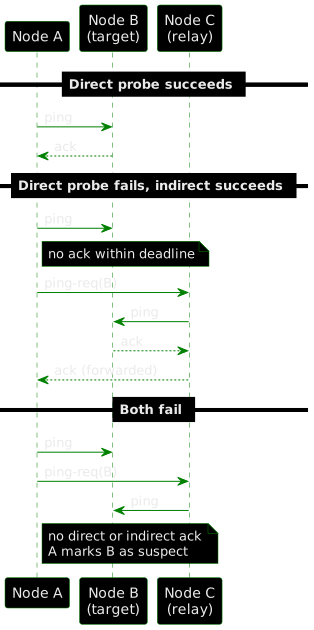
Figure 1. Sequence Diagram - the three outcomes of a probe: direct ack, indirect ack via a relay, and no ack leading to suspicion.
Dissemination
The interesting part is that SWIM has no dedicated “gossip” message. Instead, every ping, ack and ping-req carries a small number of recent membership updates piggybacked on it (e.g., “node 7 is suspect”, “node 3 is alive”). Each update is attached to a bounded number of outgoing messages before it retires, with the least-sent updates going first. Because every node is constantly probing random peers anyway, updates spread through the whole cluster in O(log N) protocol periods without any additional traffic. That is why the protocol is called “infection-style” - updates spread the same way an infection would, from node to node, without a dedicated channel.
Incarnation and Refutation
There is one more mechanism that is needed for this to work correctly. Suppose node B is healthy, but one ping to it was lost and the indirect probes were lost as well. Now the update “B is suspect” is spreading through the cluster, and after the suspicion timeout B would be declared dead even though nothing is wrong with it. To prevent this, every member has an incarnation number. When B hears that it is suspected, it increments its own incarnation and gossips “B is alive at incarnation 5”. The rule for merging updates is that a higher incarnation always wins, and at equal incarnation the more severe state wins (dead over suspect over alive). So B’s refutation overrides the older suspicion wherever it has already spread.
Lifeguard: Local Health
The original SWIM has a known weakness: a node with a broken network connection of its own cannot reliably tell whether other nodes are dead. If one node loses connectivity, all of its probes fail, so it starts marking other nodes as suspect. When the connectivity comes back, it brings all these false suspicions with it, and every healthy node has to refute them. Lifeguard addresses this with the local health multiplier (LHM). Each node tracks a small counter that goes up when its own probe fails or when it has to refute a suspicion about itself, and goes down on each successful probe. All of its timeouts - the ack deadline, the probe deadline, the suspicion timeout - are multiplied by 1 + LHM. As a result, a node with bad connectivity becomes slower in deciding that others are dead, and so it produces fewer false suspicions for the rest of the cluster to deal with.
The Simulator
The simulator runs a cluster of virtual nodes in the browser. Time is discrete - the simulation advances in ticks, and every message takes exactly one tick to arrive. The run is deterministic: the same seed and the same actions always produce the same result, which is useful if you want to reproduce something you saw.
If the embedded view is too small for your screen, open the simulator in a new tab. The source code is on GitHub.
A few things to know before using it:
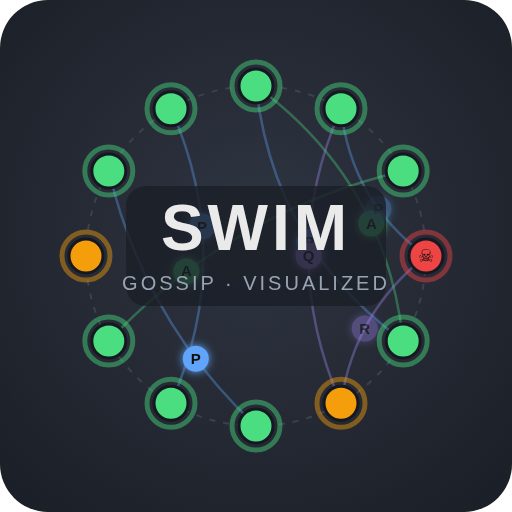
- Nodes are placed on a ring. The fill color shows what the majority of the cluster thinks about the node: green is alive, amber is suspect, red is dead. The thin donut around each node shows how the opinions are split between peers.
- Dots moving between nodes are messages:
Pis ping,Ais ack,Qis ping-req,Ris the relay’s indirect ping or ack,Lis a graceful leave. A dot that fades out mid-flight is a dropped message. The dot size grows with the number of piggybacked updates. - Top bar shows the current tick, alive/suspect/dead counts, the convergence percentage (how many beliefs across the cluster match the ground truth) and the detection latency of the last kill.
- Bottom bar has play/pause/step controls, a tick duration slider, seed and cluster size with a restart button, a global packet loss slider and a drawer with SWIM parameters (protocol period, number of indirect probes, suspicion multiplier, etc.).
- Clicking a node opens the inspector with the node’s membership table, who doubts it, probes in flight, its LHM, counters, and per-node actions: Kill, Isolate, Heal, Leave and Rejoin.
The default tick duration is 2 seconds, which is convenient for following a single message but slow when waiting for a suspicion timeout. For the experiments below I recommend dragging the tick slider down to around 500 ms.
Experiments
1. Kill a Node
Click any node and press Kill. The node stops responding to anything, but nobody knows about it yet, so it stays green with a skull marker.
Within a few ticks some node’s ping goes unanswered, then three ping-reqs fan out to relays, and the relays’ pings go unanswered as well. The node turns amber - one peer suspects it now, and that suspicion starts riding on every message this peer sends. The amber spreads around the ring quickly. After the suspicion timeout (24 ticks for a cluster of up to 10 nodes, a bit more for larger clusters) the node turns red.
The detection latency in the top bar shows how many ticks passed from the kill until every running node agreed that the node is dead. Try the same experiment with 30 or 50 nodes instead of 12. The suspicion timeout grows with the logarithm of the cluster size, so the detection latency grows too, but slowly. This slow growth of detection latency with cluster size is what the “scalable” in the protocol’s name refers to.
2. Drop Packets
Restart the cluster and move the global fail slider to 30%, so roughly a third of all messages are lost.
Nodes start flickering amber. A ping gets dropped, the ping-reqs get dropped too, and a node that is healthy becomes suspect. After that it recovers - the suspected node hears about the suspicion on the next message it receives, increments its incarnation and gossips an alive update. Click any node and look at the refutations counter in the inspector - it increases every time the node had to defend itself.
Now move the slider to 60%. At some point the refutations no longer arrive before the suspicion timeout expires, and healthy nodes get declared dead. Convergence in the top bar drops below 100% and doesn’t fully recover. This is the usual trade-off in failure detectors - a shorter suspicion timeout gives faster detection but also more false positives, and the more packets are lost, the more the balance moves towards false positives.
3. Isolate a Node
Set the packet loss back to 0, click a node and press Isolate. This sets 100% packet loss in both directions for this node only, so from its point of view all peers went silent at once.
Keep the inspector open and watch the local health value. It increases with every failed probe, and the node’s probe interval and timeouts stretch accordingly. It still suspects peers, but slower and slower. Meanwhile the rest of the cluster suspects the isolated node, declares it dead, and continues normally. Convergence drops a little, because the beliefs of the isolated node no longer match the rest of the cluster, and it stays at that level.
Now press Heal. The node becomes reachable, learns that it is considered dead, refutes with a higher incarnation and is accepted back. Its LHM goes down with each successful probe. Note also that the stale suspicions the isolated node had about its peers did not spread through the cluster after healing - because of LHM, most of them did not reach the suspicion timeout while the node was isolated.
4. Disable Indirect Probes
Open the SWIM params drawer and set indirectProbes to 0. A failed direct ping now leads straight to suspicion, without asking anyone else.
Set global packet loss to 20% and compare the picture with experiment 2. Suspicions appear much more often, because a single dropped packet is enough. With three relays a false positive requires the direct ping and all three indirect paths to fail, which at 20% loss is rare. Indirect probing is how SWIM tells the difference between a target that is really down and a link that is just flaky, and it is cheap - only a few extra messages per failed probe.
5. Disable Lifeguard
Set indirectProbes back to 3 and set lhmMax to 0, which turns off the local health multiplier. Repeat experiment 3: isolate a node, let it run for 30-40 ticks, then heal it.
This time the isolated node has been running its failure detector at full speed with no feedback, and by the time it is healed it believes most of the cluster is dead. When the node is healed, all these beliefs come back into the cluster together with it. Healthy nodes turn amber as the returning node’s suspicions spread, and each of them has to refute. The cluster recovers, but it spends a burst of messages and some time in an inconsistent state that Lifeguard would have avoided. This scenario, where a single node with bad connectivity causes trouble for the whole healthy cluster, is exactly the problem that the Lifeguard paper addresses.
What Is Not Modeled
As mentioned above, the simulator is not a production implementation. There are a few differences to be aware of if you want to apply what you saw here to memberlist or Ringpop:
- No anti-entropy. Real implementations periodically exchange full membership tables with a random peer (
memberlistcalls it push-pull sync). In the simulator membership changes travel only as piggybacked updates, so two nodes whose views have diverged after the gossip died out never reconcile. It is visible after a long isolation. - No nack from relays. In Lifeguard, a relay that cannot reach the target replies with a
nack, which lets the prober distinguish “the target is down” from “my own network is bad” and raise its LHM only in the second case. In the simulator every failed probe raises LHM. - Simplified network. Fixed one-tick latency, independent drops, loss configured per node or globally. There is also no way to split the cluster into two groups that still can talk inside the group but not to each other (network partition / split-brain).
The full list, including dynamic suspicion timeouts and crash recovery, is in the project README.
Conclusion
SWIM itself is not a complicated protocol, but it is hard to reason about how it behaves under failures just by reading the paper. The experiments above show the main things that I think are important in practice:
- Detection latency grows with the cluster size, but slowly (logarithmically).
- False positives are expected and are controlled by the suspicion timeout and the number of indirect probes - they are a matter of tuning, not a bug.
- Incarnation numbers allow a node to refute a false suspicion about itself.
- A node that cannot reach the rest of the cluster should first assume that the problem is on its side - this is what Lifeguard’s local health multiplier does.
The simulator is available at nazarii-piontko.github.io/gossip-visualizer and the source code at github.com/nazarii-piontko/gossip-visualizer - feel free to explore, break things, and contribute. If you need a production implementation, memberlist is the one to look at - most of its configuration options map directly onto the parameters in the simulator’s drawer.
Leave a comment